


Deliver fast, reliable service with a cloud system that updates in real-time and scales with your business.

Control your data and infrastructure with a secure, offline-ready solution tailored for complex environments.

Empower customers to check in, book, or update their appointments without staff assistance.

Deliver fast, secure access for repeat visitors using AI-powered facial recognition.
 Banking
Streamline customer flow and reduce wait times in banks and financial institutions.
 Healthcare
Refine patient check-ins and improve healthcare service.
 Public
Sector
Public
Sector
Manage citizen services smoothly in government offices and public institutions.
 Retail
Improve shopping experiences by minimizing checkout lines and wait times.
 DMV
DMV
Organize customer service queues in automotive showrooms and service centers.
 Airport
Speed up passenger processing with efficient queue management at terminals.
All Industries → AI Appointment Booking System
Automate appointment scheduling with AI-powered booking, smart reminders, and seamless customer check-ins.
 Appointment
Booking
Appointment
Booking
Offer flexible scheduling that helps customers plan their visit and avoid peak-time congestion.
 Biometric
System
Biometric
System
Speed up identity verification and check-ins using facial or fingerprint recognition.
 Automation
Automate workflows and reduce manual tasks with smart queue solutions.
 Virtual
Queuing
Virtual
Queuing
Let customers wait from anywhere home, car, or cafe with mobile-based virtual queues.
 Visitor
Management
Visitor
Management
Track and manage visitor entry, exit, and ID verification from a single dashboard.
 Video
Queue
Video
Queue
Allow people to join video calls instantly with one link—no apps, Accessible on any browser.
 Tele-Consultation
Offer seamless virtual consultations with real-time communication tool.
All Solutions →
Explainer
Videos
Watch quick product demos and tutorials to understand how Qwaiting works for your business.
 Blog
Blog
Read expert insights, tips, and industry trends to enhance customer experience.
 Ebooks
Download in-depth guides and resources to explore queue management best practices.
 Self Guided
Demo
Self Guided
Demo
Explore Qwaiting in a quick interactive demo, no signup needed.
Explore the 7 main types of queue management systems—physical, virtual, appointment-based, digital ticketing, self-service kiosk, mobile, and omnichannel. Compare their benefits, limitations, use cases, and scalability to choose the right solution for your customer flow.
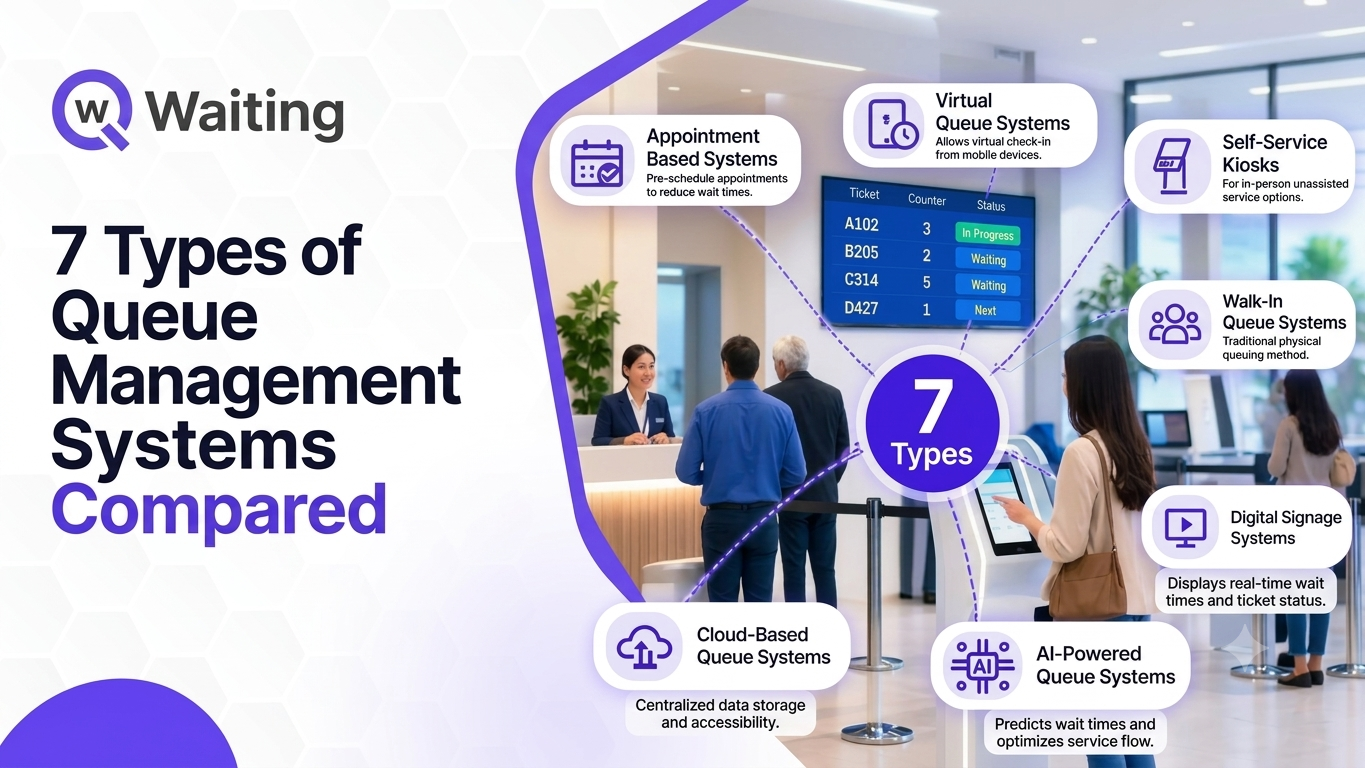
Queue management issues rarely arise due to high customer turnout. This is because there is usually an incompatibility between the manner in which customers arrive and the arrangement at the service point. A bank created for walk-ins will find itself with difficulties when a substantial portion of its clients have booked prior appointments. This is the reason why the types of queue management systems are more important than the average consumer may think. This ranges from paper tickets marked with numbers all the way to advanced systems that combine websites, phones, kiosks, and reception desks all into one system. All of these have their own unique uses, but selecting the wrong one will mean paying for things you don’t even need. This blog examines the seven kinds of queue management systems: physical, virtual, appointment, ticket, self-service, mobile, and omnichannel. For all of these, the working principles, benefits, and disadvantages of their use will be provided. We also help you know how to choose a model that matches the way your customers actually show up. A queue management system organizes how customers arrive, wait, and get served. The idea is simple. The setup behind it varies widely, and that variation is what the rest of this guide sorts out. Most systems follow the same basic path, whatever technology sits underneath: Arrival or appointment. The customer walks in, or turns up for a slot booked earlier. Registration and check-in. They register at a desk or kiosk, or scan a QR code or open a link. Queue assignment. The system places them in the right queue by service type, priority, or language. Notification. A screen, announcement, SMS, or WhatsApp message tells them when their turn is near. Service delivery. Staff call the customer and serve them at the right counter. 6. Timing and analysis. Each stage gets timed so that managers know wait times, service times, and peak times. The final stage is the one that's always left out. Without it, the queue is merely a line with numbers attached to it. With it, one knows where the demand accumulates and where the waste of time occurs. Customers rarely judge a wait by its length alone. David Maister's classic paper, The Psychology of Waiting Lines, makes the point that uncertain and unexplained waits feel longer than known, explained ones. Traditional queues fail on exactly those counts: Long physical lines that tie customers to one spot Poor visibility into wait times, so people guess and worry Crowding and confusion at entrances and reception areas Limited communication, usually a screen or a voice calling out numbers No easy way to absorb peak demand when it arrives all at once In hospitals and public offices, crowding is also a question of comfort, privacy, and access, not just speed. There are two main factors on which queue management systems may vary, namely, the position of customers in the queue and the mode by which they join the queue. The seven queue system categories covered here are: Physical: tickets or tokens, with customers waiting on site Virtual: customers join remotely and keep their place in line Appointment-based: customers reserve a time before they visit Digital ticketing: paper tickets replaced by digital queue numbers Self-service kiosk: customers check in and choose services themselves Mobile: the queue is managed from the customer's smartphone Omnichannel: every entry point feeds one coordinated queue These queue management system types overlap. The kiosk can generate a ticket that is placed in the virtual queue among other appointments. Most of the contemporary systems use a combination of the approaches mentioned above. This is the oldest model and still the most common. Its strength is familiarity. Its weakness is that customers must be on site for every minute of the wait. A physical queue system is the traditional take-a-number approach: a ticket, a token, or a marked line. Customers stay at the location until they are called. It can be as basic as a ticket dispenser and a counter display. The client gets a ticket or token and is assigned a queue number. The number is called via an announcement from the screen. The clients are served according to their queue number at the counter. They are common in bank branches, government offices, hospital registration areas, retail service desks and service centers. Anywhere with steady walk-in traffic and an expectation of first-come, first-served fairness, you are likely to find one. Where they work Simple and familiar to almost every customer Handle high walk-in traffic without needing a phone or an account Where they struggle Customers must stay at the location, however long the wait runs Busy periods create congestion in waiting areas Wait-time visibility is limited unless software tracks the queue behind the tickets Virtual queuing separates your place in line from your physical presence. That single change affects waiting-room space, customer mood, and how staff manage the floor. In a virtual queue, customers join without standing in a physical line. They can wait at home, in the car or at a nearby shop while the system keeps their place. Virtual queue management turns the waiting area from a holding pen into an optional space. A customer joins by scanning a QR code, opening a web link, or asking a staff member to register them. They then see their position or an estimated wait. As their turn approaches, an SMS or WhatsApp message tells them to head back. Staff-assisted registration matters more than it sounds. It keeps the queue open to people without smartphones, so remote joining becomes an extra option instead of a barrier. The virtual vs physical queue question comes down to a few practical differences: Virtual is not automatically better. A site where most visitors arrive without phones, or where service takes only a minute or two, may not gain much. The advantage grows with longer waits and more crowded spaces. Healthcare is the clearest case, since patients can wait away from a packed waiting room. Banking and government services benefit when walk-in volume spikes without warning. Retail and restaurants use remote waiting to keep entrances clear and customers happy. High-volume service centers gain the most, because the longer the wait, the more a remote option is worth. Timely SMS and WhatsApp alerts are what make remote waiting trustworthy. Appointments move the waiting decision from the day of the visit to the day of booking. They work best when demand can be planned and service times are fairly predictable. Customers reserve a specific date and time before they visit. On arrival, they check in and join the queue at their slot instead of the general line. Appointment scheduling software is the engine behind this model. It spreads demand across the day, instead of letting it bunch up at opening time and lunch It gives staff time to prepare, so the right person, room and documents are ready It cuts unpredictable walk-in volume, which is what makes peaks so hard to staff Appointments are not a cure-all. No-shows leave idle gaps, and a schedule that runs late still creates a waiting room. Appointments suit services with longer, more predictable durations, such as consultations and account openings. Walk-in queues suit quick transactions and urgent needs, where asking people to book first would be a hurdle. Most sites need both. A hybrid model reserves part of the day's capacity for walk-ins and places both groups in one managed queue. That way, appointment holders are not stuck behind a surge of walk-ins, and walk-ins are not ignored. Clinics and hospitals use appointments to plan patient flow and staff schedules. Banks use them for advisory services. Government departments use them to give citizens a predictable visit. Professional services and customer service centers use them anywhere a consultation needs preparation. For a deeper look at how booking fits the wider customer journey, see Qwaiting's guide to AI appointment booking. Digital ticketing keeps the familiar take-a-number experience and replaces the paper behind it. The customer notices little difference. The operator notices a lot. It swaps paper tickets for digital queue numbers that connect to display screens and staff counters. The number can be issued by a kiosk, a phone or a receptionist, but it lives in the system rather than in someone's hand. The customer checks in and gets a digital queue number. As staff finish with one customer, the queue moves forward on its own. When the turn arrives, the customer is alerted by a screen, an announcement or a message. On its own, digital ticketing usually assumes the customer is still on site. It becomes remote waiting only when paired with virtual queuing. The gap shows up behind the counter more than in front of it: Better visibility. Managers see every queue live, and digital signage shows customers where they stand Easier tracking. Nobody counts leftover paper slips or guesses how many people are waiting Less manual handling. Employees quit dialing the numbers manually and setting up kiosk dispensers. Better data collection. Every ticket carries timestamps for arrival, wait, and service, which is the raw material for improving digital queue management over time A kiosk moves the first step of service from a desk to a screen. Routine check-ins no longer need a staff member, which frees the front desk for people who need real help. The customer registers himself/herself or selects a service independently from a computerized terminal at the entrance. Many self-service kiosks also let people check in for an appointment they booked earlier. Faster check-in: several people can register at once instead of one at a time Less pressure on reception, which is often where the first bottleneck forms Routine requests handled without staff, such as simple check-ins and service selection Multiple service types supported, so customers reach the right queue from the first tap Hospitals use them for patient check-in. Banks and government offices use them to sort visitors by service. Retail service desks, airports, and transportation hubs use them where visitor numbers make staffed desks hard to scale. One caution: a kiosk should never be the only door. Clear screens, language options, and a staffed fallback keep the service accessible to everyone, including people who find touchscreens difficult. Most customers already carry the device a modern queue needs. Mobile systems make the phone the control point for joining, tracking, and returning. A mobile queue system lets customers interact with the queue through their smartphones. It overlaps with virtual queuing, but the two are not identical. Virtual describes the idea of waiting remotely. Mobile describes the channel the customer uses to do it. QR codes at the entrance, on a poster or on a receipt Mobile web pages that open in the browser, with no app to download Shared links sent by SMS, email, or a messaging chat Digital service portals where customers pick a service and join from the organization's own site A wait that can be checked on a phone feels different from one that cannot. Customers can step away from crowded areas, watch their position change, and receive an alert when it is time to return. That addresses the uncertainty Maister described, because the customer always knows where they stand. For the organization, the gain is control over the journey. You decide what customers see, when they hear from you, and what they are asked to do next. Omnichannel is less a separate tool than a design principle: every way a customer can enter service feeds the same queue, under the same rules. It connects multiple queue entry points into one coordinated experience. Someone who booked online, a walk-in who used a kiosk, and a visitor registered by a receptionist all appear in a single view, and all are served by the same logic. Walk-ins, appointments, mobile and website entries, QR codes, self-service kiosks, and staff-assisted check-in can all feed one queue. The test is simple: can a manager see every one of them in the same place? Without it, each channel becomes its own small queue, and the customer who used the wrong door ends up waiting the longest. Connecting them changes four things: One customer journey. A person can book online, check in by phone, and be served at a counter without repeating their details Centralized visibility. Managers see total demand, not fragments of it Better demand management. Staff can shift to wherever a channel is surging A consistent experience. Messages, priorities, and fairness rules stay the same across channels and branches This table puts the seven models side by side. See it as a launching point instead of a conclusion because in actual deployment, one may find a combination of several. Read the ratings as general tendencies. A specific product may do more or less than its category suggests, so check real capabilities against your own operation. No single model wins everywhere. Five questions narrow the field quickly, and the first one usually does most of the work. Mostly walk-ins point toward physical, digital ticketing, or kiosk models. Mostly booked visits point toward appointments. Mixed traffic is the most common case, and it calls for a system that handles both in one queue. Check your own arrival data by hour before you decide. Some customers want to sit on site with a clear display. Others would rather wait elsewhere, join from a phone, or arrive at a set time. Offer more than one option, because a single waiting style will always disappoint someone. A small location may need little more than digital ticketing. High-volume branches usually gain from virtual queuing and kiosks. Multi-location operations need shared rules, central control, and consistent reporting across sites. List the touchpoints you need: queue number displays, SMS, WhatsApp, mobile notifications, digital signage. Choose channels your customers already use. In many regions, a WhatsApp message may suit them better than an app they must download first. A queue system that cannot talk to your other tools creates a second set of records to maintain. Put these questions to every vendor: Does it connect to our existing booking, CRM, or ERP systems? Can we see wait times and service times by branch, counter, and hour? Can we measure staff workload and no-shows without exporting spreadsheets? Yes, and most end up doing so. Walk-ins, appointments, and remote joiners often arrive within the same hour, and one model rarely serves all three well. Customers differ in what they need and how they want to wait. Walk-ins and appointments coexist at nearly every service point. And once you add a website, a kiosk, and a front desk, those channels have to work together, or customers feel the seams. Virtual queue + appointment scheduling: booked visitors and remote walk-ins share one managed flow, so neither group gets stranded Kiosk + physical queue: the kiosk handles check-in and issues the ticket, while customers wait on site with a display to follow Mobile queue + digital signage: remote customers track their place on a phone, and those on site follow the screen Appointment + walk-in management: part of each day's capacity is held for walk-ins, so bookings never crowd them out The seven models above are not rival purchases. Qwaiting is a global queue management and customer journey platform that runs them side by side, so walk-ins, bookings and remote joiners share one flow. Virtual queues: customers join from a QR code or kiosk and wait wherever they like Physical queue management: on-site flows run on on-premises queue software for organizations that want control over their own data and infrastructure Appointment scheduling: pre-booked slots merge with walk-ins instead of competing with them Self-service kiosks: check-in and service selection without a front-desk wait Digital displays: screens and voice announcements call the next customer, with support for multiple languages SMS and WhatsApp notifications: customers hear when their turn is near The goal is not a prettier line. It is a journey where customers choose how they wait, waiting areas stay uncrowded, and staff see demand before it turns into a backlog. Operational analytics on wait times, service times, no-shows, and staff productivity show where that journey breaks. For multi-branch groups, an enterprise setup keeps the experience consistent across locations and channels. Each sector has its own queue problem, and the platform is shaped around it: Healthcare: patient check-in and appointment arrivals Banking: branch queues and service requests across counters Retail: store traffic and checkout lines Government and public services: citizen queues spread across several service counters Other high-volume environments, including airports and education Still maintaining one queue system for all customers? Explore how Qwaiting can support your specific setup, from a single physical branch to a connected, multi-channel operation. Request a demo and talk through your own queue model with the team. Queue management models vary widely, but there is no single system that can be implemented universally in any organization. Different customer behavior, level of services offered, location, and goals will determine which model works best for your business. Physical queues do have their place in today’s world, particularly in situations where your customers physically come to you and have no good reason to wait anywhere else. A useful first step costs nothing. Keep track for one week of how people come, how long they have to wait, and where the queue gets backed up. That will enable you to determine if any of the seven models addresses a particular problem, or rather adds on to existing features. The trend overall is moving from managing a queue to managing the entire customer journey from when he decides to visit until he leaves. When you look at your current business operations, which part of the journey does not yet have a plan?What Is a Queue Management System?
How Does a Queue Management System Work?
Why Are Businesses Moving Beyond Traditional Queues?
Different Types of Queue Management Systems
1. Physical Queue Management Systems
What Is a Physical Queue System?
How Does it Work?
Where Are Physical Queue Systems Used?
Pros and Cons of Physical Queue Systems
2. Virtual Queue Management Systems
What Is a Virtual Queue?
How Does a Virtual Queue Work?
Virtual Queue vs Physical Queue
Where Does Virtual Queuing Work Best?
3. Appointment-Based Queue Management Systems
What Is an Appointment Queue System?
How Does It Reduce Waiting?
Appointment Queue vs Walk-In Queue
Best Use Cases
4. Digital Ticketing Queue Systems
What Is a Digital Ticketing System?
How Does Digital Ticketing Work?
Digital Ticketing vs Traditional Paper Tickets
5. Self-Service Kiosk Queue Management Systems
What Is a Self-Service Queue Kiosk?
How Do Kiosks Improve Customer Flow?
Where Are Queue Kiosks Most Useful?
6. Mobile Queue Management Systems
What Is a Mobile Queue System?
How Can Consumers Enter the Queue via Their Mobile Phones?
Why Mobile Queuing Matters
7. Omnichannel Queue Management Systems
What Is an Omnichannel Queue Management System?
Which Channels Can It Connect?
Why Is Omnichannel Queuing Different?
Comparing the 7 Types of Queue Management Systems
How Do You Choose the Right Queue Management System?
Consider Your Customer Arrival Pattern
Consider How Customers Prefer to Wait
Consider Your Service Volume
Consider Your Customer Communication Needs
Consider Integration and Analytics
Can Businesses Combine Different Types of Queue Management Systems?
Why One Queue Model May Not Be Enough
Examples of Hybrid Queue Management
How Qwaiting Brings Different Queue Management Models Together
One Platform for Different Customer Entry Points
Move From Managing Lines to Managing the Customer Journey
Built for Different Industries and Operating Models
Final Thoughts