


Video conferencing software for Instant Virtual Consultations
Connect over video the moment clients need you. No app required. Customers join the queue from a link or QR code, see their live position, and when it's their turn, the consultation starts right in their browser.
- ✓ Real-time queueing with live ETAs
- ✓ Browser-based video consultation
- ✓ Join from anywhere, anytime






What Is a Video Queue?
A video appointment software is a virtual line for virtual consultations. Instead of scheduling a fixed appointment, customers can join the queue online, monitor their live position and estimated wait time, and receive a browser link as soon as an agent is available. This walk-in-style service is delivered through video, with no app required to download.
It solves the problem scheduled video calls can't: real conversations rarely fit fixed slots. A video queue adapts to actual conversation length, keeps agents busy, and keeps customers informed — turning "book a call next Tuesday" into "you're third in line, about 12 minutes."
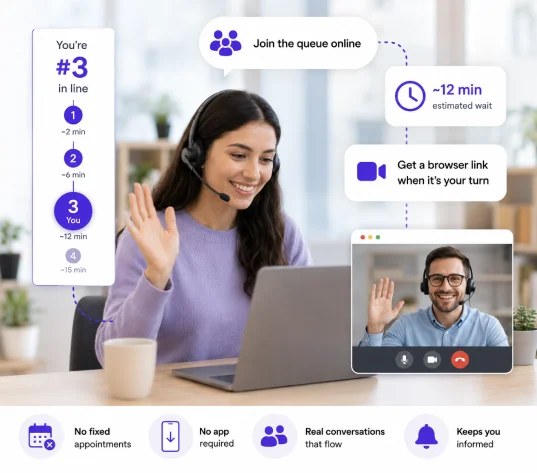
How the Video Queue Works
Seamless flow from request to resolution.
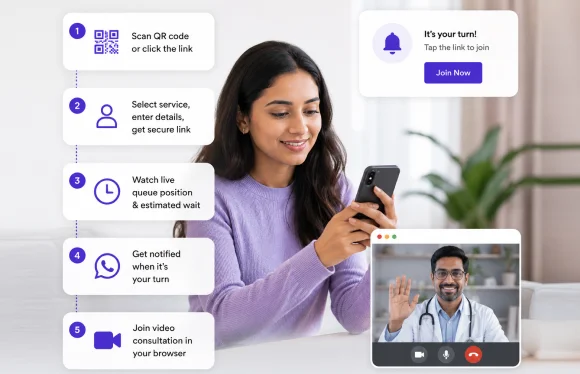
For Customers
- ✓ Scan a QR code or click the link to the video queue page.
- ✓ Select the service, enter your name and email, and receive a secure link.
- ✓ Watch live queue position and estimated wait on the queue screen.
- ✓ Get an email or WhatsApp message when it's your turn.
- ✓ Join the video consultation directly in the browser.
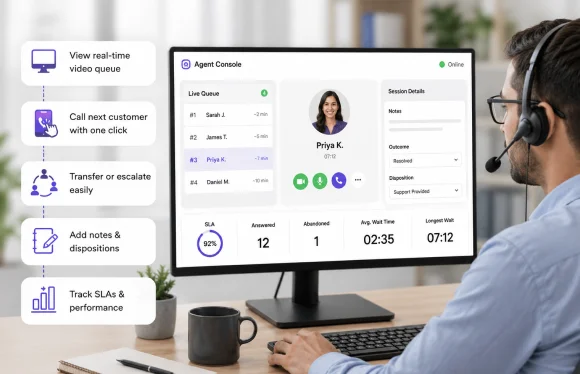
For Agents
- ✓ Open the Agent Console to view the real-time queue.
- ✓ Call the next customer with one click. Customers join instantly via their link.
- ✓ Transfer or escalate to another agent or department when needed.
- ✓ Add notes, outcomes, and dispositions for accurate reporting.
- ✓ Track SLAs with built-in timers, statuses, and dashboards.
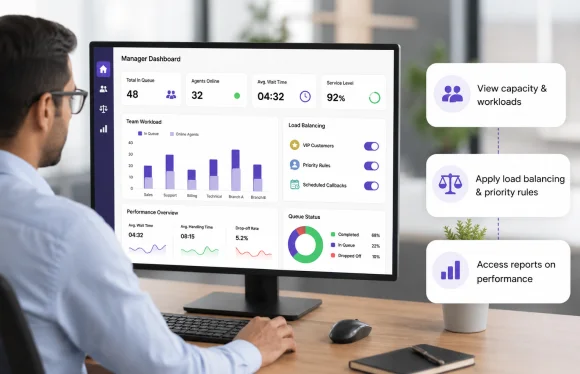
For Managers
- ✓ View capacity and workloads across teams and branches.
- ✓ Apply load balancing and priority rules (VIPs, scheduled callbacks).
- ✓ Access reports on wait times, handling times, and drop-offs.
Smarter Identity Verification
from Check-In to Service
Qwaiting's biometric recognition creates a seamless customer journey by retrieving their information and directing them to the right queue or service desk.
Fast, Contactless Identity Verification
Verify identities instantly and securely with facial recognition.
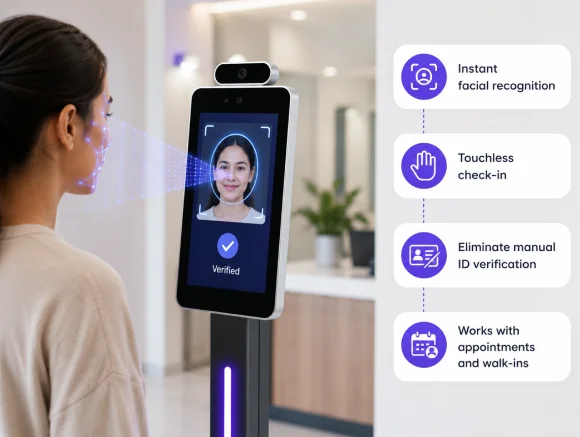
- Instant facial recognition
- Touchless check-in
- Eliminate manual ID verification
- Secure authentication
- Works with appointments and walk-ins
Intelligent Routing After Verification
Once verified, customers are automatically directed to the right service, every time.
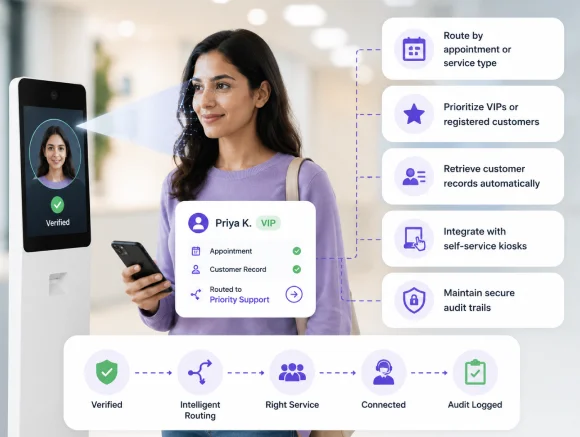
- Route by appointment or service type
- Prioritize VIPs or registered customers
- Retrieve customer records automatically
- Integrate with self-service kiosks
- Maintain secure audit trails

Stronger Security
Reduce fraud with accurate biometric identity verification.

Faster Flow
Accelerate check-ins and keep queues moving efficiently.

Better Experience
Deliver seamless, touchless service with shorter wait times.

Smarter Operations
Automate customer routing and improve operational efficiency.
Built for Real-World Service Challenges

Appointments rarely fit
Fixed bookings don't match real conversations. Overruns cause delays, short calls waste time. Video queue adapts dynamically so long calls.

Download fatigue kills show-up rates
Customers shouldn't need Zoom, Teams, or Meet for quick support. With Qwaiting, it's 100% browser-based. Tap the link, join instantly.

Poor visibility drives abandonment
When people can't see progress, they leave. Live queue and ETA keep customers engaged and reduce drop-offs.

Operational complexity
Multi-branch or multilingual? Video queue routes customers efficiently, balances workloads, and enforces SLAs — without requiring manual calendar juggling.
The Problem with Traditional Video
Traditional video calls can be rigid and inconvenient. Meetings often run late or end early, leaving agents idle and customers waiting. Requiring app downloads only adds more friction, slowing down simple support requests.

Skip Scheduled Calls: Connect Instantly
Qwaiting's advanced video queue removes confusion by letting customers join in real time and get served on a first-come, first-served basis. Benefits include
- ✓ No app or downloads needed
- ✓ Join calls instantly, no booking
- ✓ Receive call links via email or SMS
- ✓ Access from any browser
- ✓ See real-time queue updates
Key Features
Deliver real-time customer service that's simple for users and powerful for your teams.

No Appointments Required
Walk-in style, 24/7/always-on or business-hours only.

Instant Video Link
Secure, Browser-Based Video Calls, single-tap access.

Live Queue Position
Clear expectations, fewer drop-offs.

No Downloads Needed
Works across modern browsers and devices.

Smart Notifications
Email/SMS confirmations, live updates, join prompts.

Callbacks & Hold Options
Keep your place or request a callback.

Agent Tools
Warm transfer, notes, tags, quick replies.

Admin Controls
Hours, holidays, capacity caps, SLA targets.
What the Agent Sees
Agents stay focused, resolve faster, and deliver better service without juggling calendars.
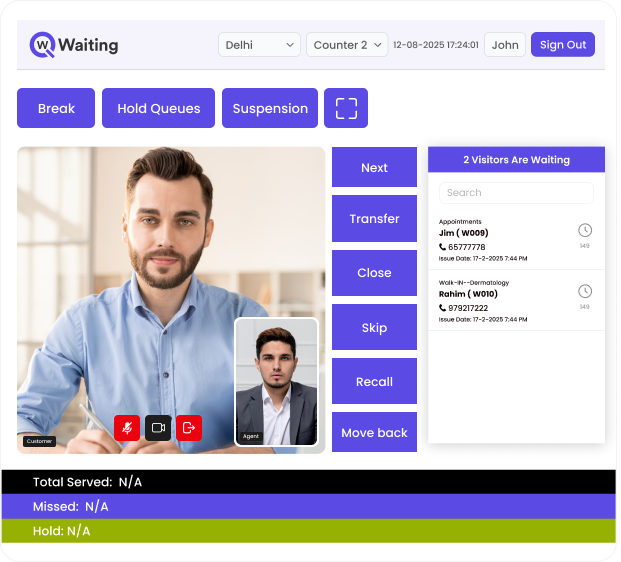
What the Customer Sees
Customers know exactly where they stand, how long it will take, and when to join, without apps, confusion, or frustration.

How Video Queue Beats Scheduled Appointments
See how dynamic queueing outperforms rigid scheduling to improve completion rates and service flow.
| Comparison | Scheduled video calls | Qwaiting Video Queue |
|---|---|---|
| Customer effort | Download apps, juggle calendars | Open the link, join in the browser |
| Time fit | Overruns disrupt the day | Adapts to real conversation length |
| Visibility | Delays unclear | Live position + ETA always visible |
| No-shows | High (friction) | Low (instant link, no install) |
| Ops control | Rigid scheduling | Dynamic routing and capacity |
Where Video Queue is used

Banking & Financial Services
Video banking made practical

Healthcare & Insurance
Member inquiries and pre-visit triage (non-diagnostic).

Government & Public Services
Permits, compliance, citizen helpdesks.

Education
Admissions, registrar support, student counseling.

Retail & Service Centers
Warranty verification and claims support.

IT Helpdesks & Managed Services
Instant troubleshooting and onboarding video helpdesk.
Go Live in Minutes, Not Months
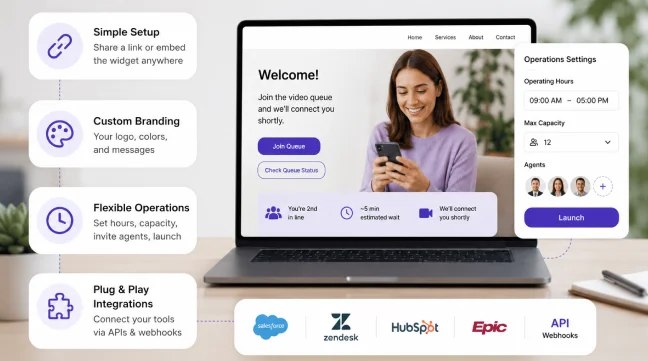
Simple Setup
Share a link or embed the video queue widget in your website or app.
Custom Branding
Your logo, colors, and messages.
Flexible Operations
Set hours, define capacity, invite agents, launch instantly.
Plug & Play Integrations
Connect your CRM, helpdesk, or EMR via APIs and webhooks.
Frequently Asked Questions
Turn Waiting Time into Resolution Time
Trusted by 10000+ Customers Worldwide
Join the industry leaders who trust Qwaiting for their queue management